Firmtools RedEyeBot image viewer download full latest version
Showing posts with label picture. Show all posts
Showing posts with label picture. Show all posts
How To Rotate A Video In VLC With 6 Easy Steps Picture Help
Getting some problem in your video ? or maybe you just captured the video from iPhone, Samsung, Sony, Tablet, or Smartphones with wrong video degrees and now you want to rotate that video in VLC without any software or without doing too much work on that ?
So then here is the best and easily solution with pictures help where you can read and see that how can i rotate video in VLC.
Note: You should update your vlc or download the latest VLC player from Here.
Step 1: Open VLC & Select Tools (Video Must Be Open In VLC)
.png)
Step 2: Select Effects and Filters
.png)
Step 3: Click On Video Effects
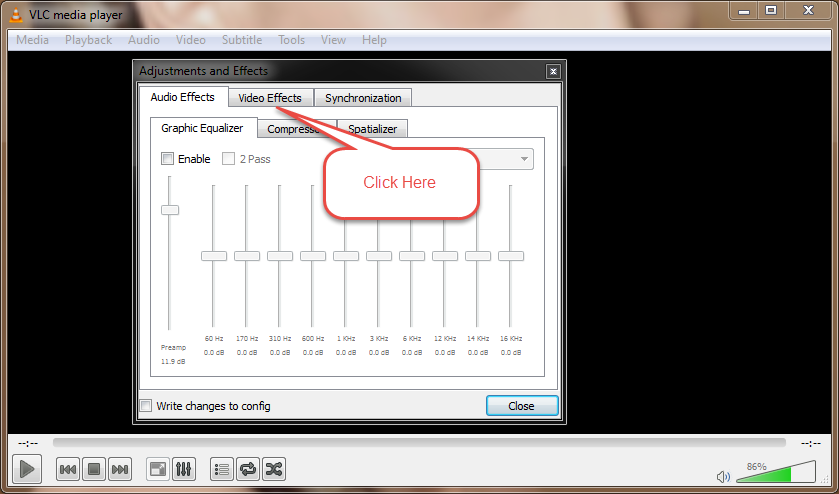.png)
Step 4: Click On Geometry
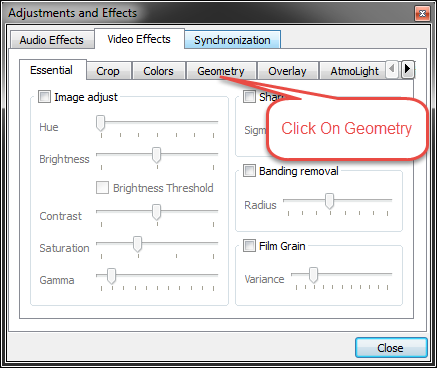.png)
Step 5: Check Box (Rotate)
.png)
Step 6: Now Last Step Just Move This Angel & Youre Done!
.png)


Read more »
So then here is the best and easily solution with pictures help where you can read and see that how can i rotate video in VLC.
Note: You should update your vlc or download the latest VLC player from Here.
Step 1: Open VLC & Select Tools (Video Must Be Open In VLC)
Step 2: Select Effects and Filters
Step 3: Click On Video Effects
Step 4: Click On Geometry
Step 5: Check Box (Rotate)
Step 6: Now Last Step Just Move This Angel & Youre Done!
If you have face any problem to rotate your video in vlc then please im here to help you. Thanks!

Use HTML 5 Picture Element To Make Webpages Load Faster
- Responsive Web Design Has taken web Developers and designers by storm, changing the way they approach the development of a Website. However.it isnt perfect and has its imitations. According to archive.ORG, images constitute about 62% of the total weight of a webpage on everage, suggesting that theres a need for a better way than CSS rules to deliver images responsively to a virtualyy infinite nmber of screen types and sizes. Meet the new HTML 5 Picture element.

--------------------------------------------------------------------------------------------------------------------------
Why need for a new element?
--------------------------------------------------------------------------------------------------------------------------You may have implemented a responsive web design. Thinking that solves all your mobile problems. And its true that a responsive web design solves some problems t automatically arranges and displays your site element to be viewed on smaller, narrower mobile screens.
But responsive web design isnt the answer to everything. It doesnt necessarily solve the image download issue. Even with responsive dsign. many times those heavyweight images still are downloaded anway.
--------------------------------------------------------------------------------------------------------------------------
The <Picture> Element
--------------------------------------------------------------------------------------------------------------------------According to the specifications, the picture element is intended to give authors a way to control which image resource a user agent presents to a user , based on media query and/or support for a particular image format". it, "should be used when an image source exists in multiple densities, or when a responsive design dictates a somewhat different image on some types of screens ("artdirection".
the Picture element is about responsive images , not responsive design. But When it cames to Your sites performance on mobile devices, it could be significant.
The new markup element supposedly addresses the problems caused by images that were meant to be seen on a full-size monitor -- images that dont translate well to mobile devices. the <Picture> markup code tells web browsers such as Firefox to load and display the right (Smaller) Images as necessary.
Heres What it looks like;
______________________________________________________________________________
<picture>
<source srcset="small.jpg 1x, small-hd.jpg 2x">
<source media="(min-width: 480px)" srcset="medium.jpg 1x, medium-hd.jpg 2x">
<source media="(min-width: 1024px)" srcset="large.jpg 1x, large-hd.jpg 2x.jpg">
<img src="fallback.png" alt="Sample ALT description">
</picture>______________________________________________________________________________
--------------------------------------------------------------------------------------------------------------------------
Compatibility
--------------------------------------------------------------------------------------------------------------------------
The <Picture> markup element is not final yet, but is coming soon to browsers. Support for the element is expected to be turned on by default in Chrome and Firefox browsers. IE, Opera and Safari are also on their way.
An important thing to know is that <picture> markup could speed up your website, especially on mobile devices. that would be good for your site Visitors.
Feel free to implement <picture> markup in your website code. Now. Even if a browser program doesnt understand the new markup. theres a fallback command to use standard HTML image tags (notice the <img> tag within he picture element). Support for the new element will come very soon. Good luck :-) :-)
Firmtools RedEyeBot Picture Viewer 2015 Latest Full Version Free Download
Firmtools RedEyeBot image/ wallpaper/ photo viewer 2015 is alternative software by windows picture viewer. If you problem show your picture or image in your pc Firmtools

RedEyeBot image is the perfect software for opening any image/ picture/ wallpaper. In this site I shared this software 100% free full version. If you are interested this software please firstly unlocks with like us facebook, twitter or google+ page and download your software in the bellow link.

Tag: Firmtools RedEyeBot V2.3.1 Picture Viewer full registered original version program download, Firmtools RedEyeBot software full version free download, Firmtools RedEyeBot latest updated version download, Firmtools RedEyeBot program 2016 final version download, Firmtools RedEyeBot software old version 2015- V2.0.1, V1.3.0, V1.0.0,V1.3.1 V2 with serial key, Firmtools RedEyeBot cracked version full download, Firmtools RedEyeBot complete installer with keygen or activator download, Firmtools RedEyeBot for PC, laptop or notebook premium version with patch download, Firmtools RedEyeBot application full setup file download for windows XP, Firmtools RedEyeBot download for windows vista, Firmtools RedEyeBot download for windows 7,Firmtools RedEyeBot download for windows 8, Firmtools RedEyeBot download for windows 8.1,Firmtools RedEyeBot download for windows 10, Firmtools RedEyeBot download for Operating system (OS) x64/86, Firmtools RedEyeBot software download for Operating system (OS)32bit/64bit. Top PC software free download. System tools software free download,
Operating Systems: Windows XP, Windows Vista, Windows 7, Windows 8,
Watermark Video To Picture Converter 5 2 Full Version With Serial

Search: Watermark Video To Picture Converter 5.2 full registered original version program download, Watermark Video To Picture Converter software full version free download, Watermark Video To Picture Converter latest updated version download, Watermark Video To Picture Converter program 2016 final version download, Watermark Video To Picture Converter software old version 2015- V5.1 V5.0, V4.9,V4.5,V3.9 V2 with serial key, Watermark Video To Picture Converter cracked version full download, Watermark Video To Picture Converter complete installer with keygen or activator download, Watermark Video To Picture Converter for PC, laptop or notebook premium version with patch download, Watermark Video To Picture Converter application full setup file download for windows XP, Watermark Video To Picture Converter download for windows vista, Watermark Video To Picture Converter download for windows 7,Watermark Video To Picture Converter download for windows 8, Watermark Video To Picture Converter download for windows 8.1,Watermark Video To Picture Converter download for windows 10, Watermark Video To Picture Converter download for Operating system (OS) x64/86, Watermark Video To Picture Converter software download for Operating system (OS)32bit/64bit. Top PC software free download. Converter Software free download,
You can easily to convert a video file into a picture with Watermark Video To Picture Converter 2015 software. In this site I shared this software 100% free full version. If you are interested this software please firstly unlocks with like us Facebook, twitter or google+ page and download your software in the bellow link.Operating Systems: Windows 7,8,8.1, Windows Vista, Windows XP, Windows 8
Watermark Video To Picture Converter download trial version
Serial Key
WS-VTPB-CE65600780-003EFFB4ED-63C7FDFFFC
Watermark Video To Picture Converter 2015 Full Version For Windows XP vista 7 8
You can easily to convert a video file into a picture with Watermark Video To Picture Converter 2015 software. In this site I shared this software 100% free full version. If you are interested this software please firstly unlocks with like us Facebook, twitter or google+ page and download your software in the bellow link.
Operating Systems: Windows 7, Windows Vista, Windows XP, Windows 8
Watermark Video To Picture Converter download trial version
Serial Key
WS-VTPB-CE65600780-003EFFB4ED-63C7FDFFFC
